
Audi A4: Clamp on Triple Roller Joint and Outer Joint, Tensioning
Audi A4 (B9) 2016-2026 Service Manual / Chassis / Front Suspension / Drive Axle / Clamp on Triple Roller Joint and Outer Joint, Tensioning
 Note
Note
Depending on the version of the clamp, use the following tools:
Special tools and workshop equipment required
- Torque Wrench 1331 5-50Nm -VAG1331-
- Clamping Pliers -VAG1682A-
- Locking Pliers -VAS6199-
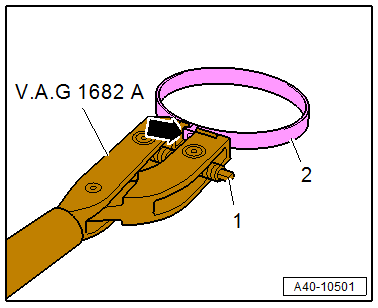
Tension the Stainless Steel Clamp using the -VAG1682A-.
- Attach the -VAG1682- as shown.
- The jaws on the pliers must be centered -arrow- on the clamp -2-.
Note
- The spindle threads must turn easily. If necessary, coat with MoS2 lubricating grease.
- If difficult to tighten, for example because of dirty threads, the proper clamping force of the clamping sleeve will not be reached even when tightened to the specification.
- Tension the clamp by turning the spindle -1- with the torque wrench. Do not tilt the clamping pliers during this.
- Tightening specification: 20 Nm.
Tension the Clamp with Retaining Tabs using the -VAS6199-.
Note
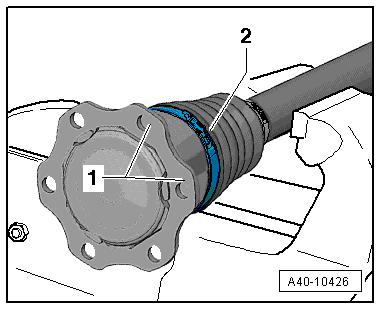
To better position the internal multi-point bolts when installing the drive axle, the clamp crimping ear -2- must be between the joint connecting flanges -1-.
- Engage the clamp at the first catch by hand.
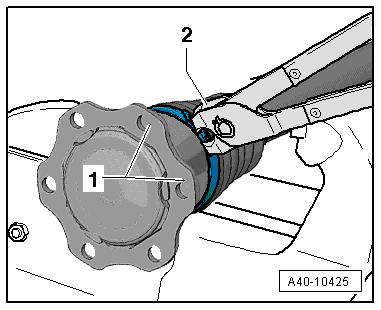
- Close the clamp using the -VAS6199--2-.
READ NEXT:
 Special Tools
Special tools and workshop equipment required
Shock Absorber Set -T10001-
Tensioning Strap -T10038-
Tripod Joint Tool -T10065-
Engine/Gearbox Jack Adapter - Wheel Hub Support -T10149-
SEE MORE:
Injection System
Component Location Overview - Injection System
Component Location Overview - Engine Compartment
1 - Oxygen Sensor after Catalytic Converter -G130- with Heater for
Oxygen Sensor 1 after Catalytic Converter -Z29-
Component location. Refer to
→ Fig. "Component Location Oxygen Senso
Specified Values for the Refrigerant Circuit Pressures
Note
On vehicles with a high-voltage system but without a heat
pump (for example on Audi A3 e-tron, Audi Q5 hybrid, Audi A6
hybrid and Audi A8 hybrid) no check valves are installed in the
refrigerant circuit. On these vehicles valves are installed in
the refrigerant circuit which regulat
© 2019-2026 Copyright www.audia4b9.com
