
Audi A4: Overview - Transmission
Audi A4 (B9) 2016-2026 Service Manual / Transmission / 7-Speed Dual Clutch Transmission 0CJ, 0CK, 0CL / Overview - Transmission
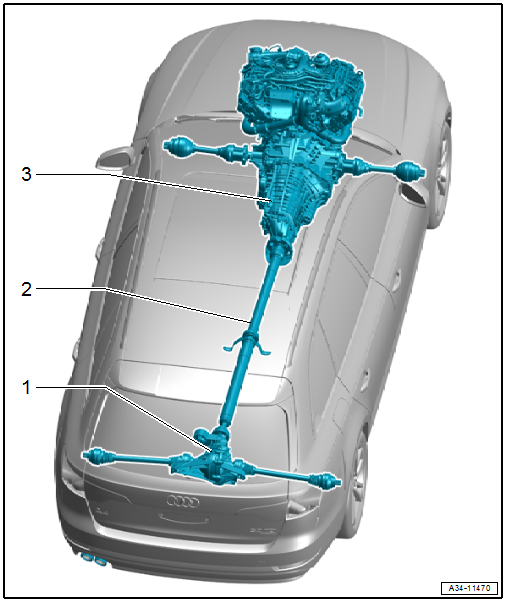
1 - Rear Final Drive
- Only for AWD
- Removing and installing. Refer to → Rear Final Drive; Rep. Gr.39; Final Drive; Final Drive, Removing and Installing.
2 - Driveshaft
- Only for AWD
- Removing and installing. Refer to → Rear Final Drive; Rep. Gr.39; Driveshaft; Driveshaft, Removing and Installing.
3 - 7-Speed Dual Clutch Transmission 0CJ, 0CK, 0CL
Clutch
All work procedures for the dual clutch are described. Refer to → Servicing - 7-Speed Dual Clutch Transmission 0CJ, 0CK, 0CL; Rep. Gr.30; Clutch
READ NEXT:
 Selector Mechanism
Overview - Selector Mechanism
Selector Mechanism in the Vehicle Interior
1 - Selector Mechanism
With the following integrated components:
Selector Lever -E313-
Selector Lever Position
Gearshift Mechanism, Checking
WARNING
Risk of injury and accident by accidentally engaging
a selector lever position with the engine running.
Before working with the engine running, move the
transmission into "P" and
SEE MORE:
Name Badges and Emblems
Overview - Name Badges and Emblems
1 -
Emblem
Removing and installing. Refer to
→ Chapter "Radiator Grille Name Badges and Emblems, Removing and
Installing".
2 -
quattro Name Badge
Equipped on some models
Removing and installing. Refer to
→ Chapter "Radiato
Transmitted information
Data collection
Applies to: vehicles with data collection
Depending on the country, Audi may collect data
for the following purposes, for example: offer
and product optimization, public safety, provision
of Audi connect remote vehicle services, and
adaptation to customer expectations. For example,
v
© 2019-2026 Copyright www.audia4b9.com
