
Audi A4: Rear Door Trim Panels
Audi A4 (B9) 2016-2026 Service Manual / Body / Body Interior / Interior Trim / Rear Door Trim Panels
Overview - Rear Door Trim Panel
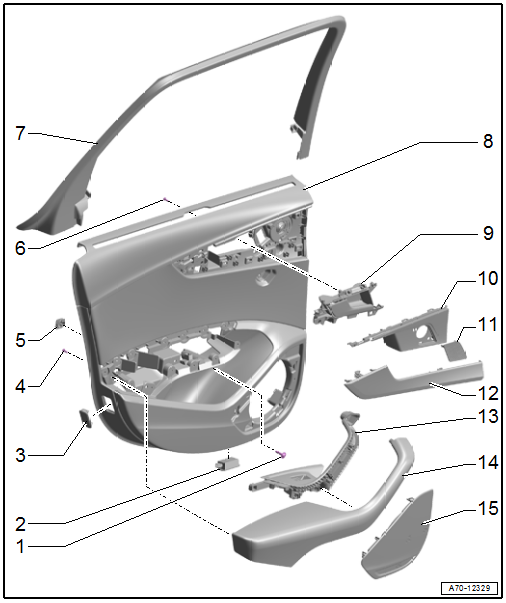
1 - Bolt
- 2.5 Nm
- For door trim panel
- Quantity: 3
2 - Rear Entry Lamp
- Driver Side Rear Entry Lamp -W83-
- Passenger Side Rear Entry Lamp -W84-
- Component location overview. Refer to → Electrical Equipment; Rep. Gr.96; Lamps; Component Location Overview - Rear Doors Lamps.
3 - Rear Reflector
- Vehicles with:
- Driver Side Rear Exit Warning Lamp -W113-
- Passenger Side Rear Exit Warning Lamp -W114-
- Component location overview. Refer to → Electrical Equipment; Rep. Gr.96; Lamps; Component Location Overview - Rear Doors Lamps.
4 - Bolt
- 1.2 Nm
- For pull handle with armrest
- Quantity: 15
5 - Clip
- For door trim panel
- Quantity: 7
- Insert in the trim panel
6 - Bolt
- 1.2 Nm
- For the interior door mechanism
- Quantity: 3
7 - Window Frame Trim Panel
- Removing and installing. Refer to → Chapter "Window Frame Trim Panel, Removing and Installing".
8 - Door Trim Panel
- Removing and installing. Refer to → Chapter "Rear Door Trim Panel, Removing and Installing".
9 - Interior Door Mechanism
- Removing and installing. Refer to → Chapter "Interior Door Mechanism, Removing and Installing".
10 - Interior Door Mechanism Decorative Trim
- Removing and installing. Refer to → Chapter "Interior Door Mechanism, Removing and Installing".
11 - Speaker Trim
- For high range speaker
- Removing and installing. Refer to → Chapter "Speaker Trim in Door Trim Panels, Removing and Installing".
- Press on until it engages audibly
12 - Decorative Trim
- Removing and installing. Refer to → Chapter "Rear Door Trim Panel, Removing and Installing".
13 - Switch Mount
- Removing and installing. Refer to → Chapter "Rear Pull Handle, Removing and Installing".
14 - Pull Handle with Armrest
- Removing and installing. Refer to → Chapter "Rear Pull Handle, Removing and Installing".
15 - Speaker Trim
- For the bass speaker
- Removing and installing. Refer to → Chapter "Speaker Trim in Door Trim Panels, Removing and Installing".
- Insert in the door trim panel and press on it until it engages audibly.
READ NEXT:
 Speaker Trim in Door Trim Panels, Removing and Installing
Special tools and workshop equipment required
Pry Lever -80-200-
Front Bass Speaker Trim, Removing
- Carefully pry out the speaker trim -1-
along the door trim panel seam using the Pry Lever
Rear Door Trim Panel, Removing and Installing
Special tools and workshop equipment required
Wedge Set -T10383-
Wedge Set - Wedge 1 -T10383/1-
Removing
- Switch off the ignition.
- Unclip the decorative trim -1-
using the -T10383/1-
Instrument Panel
Overview - Instrument Panel
1 - Screw/Expanding Clip
1.5 Nm
2 - Light Switch Trim
Removing and installing. Refer to
→ Chapter "Light Switch Trim, Removing and Install
SEE MORE:
Spoiler
Overview - Spoiler
1 -
Adhesive Tape
2 -
Front Foam Seal
3 -
Nut
4 Nm
Quantity: 4
4 -
Foam Seal
For the securing pin
Quantity: 3
5 -
Foam Seal
For the clips
Quantity: 7
6 -
Clip
There are different versions. Refer to the Parts
Messages
Text messages
Applies to: vehicles with telephone
Requirement: your mobile device must be connected
to the MMI via Bluetooth Message Access
Profile (Bluetooth MAP).
Applies to: MMI: Select on the home screen:
MESSAGES > () > e-mail (phone
1)/e-mail
(phone 2)*.
The following functions ar
© 2019-2026 Copyright www.audia4b9.com
