
Audi A4: Subwoofer -R211-, Removing and Installing
Subwoofer -R211-, Removing and Installing, Sedan
The Subwoofer -R211- is located in the rear shelf.
Removing
- Turn off the ignition and all electrical equipment and remove the ignition key.
- Remove the rear shelf. Refer to → Body Interior; Rep. Gr.70; Vehicle Interior Trim Panels; Rear Shelf, Removing and Installing.
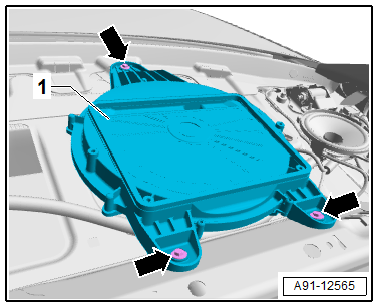
- Release and disconnect the connector from the Subwoofer -R211--1-.
- Remove the bolts -arrows- from the Subwoofer -R211--1-.
- Remove the Subwoofer -R211--1- upward.
Installing
- Install in reverse order of removal. Note the following:
Tightening Specifications
- Refer to → Chapter "Component Location Overview - Sound System, Speaker, Sedan"
Subwoofer -R211-, Removing and Installing, Avant
The Subwoofer -R211- is located in the spare tire well.
Removing
- Turn off the ignition and all electrical equipment and remove the ignition key.
- Remove the luggage compartment floor.
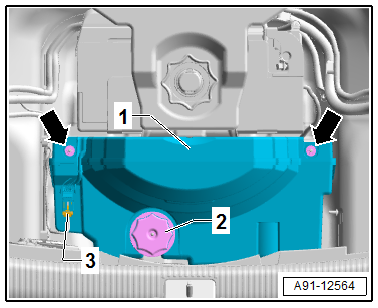
- Release and disconnect the connector -3- from the Subwoofer -R211--1-.
- Remove the bolt -2- from the Subwoofer -R211--1-.
- Remove the nuts -arrows- from the Subwoofer -R211--1-.
- Remove the Subwoofer -R211--1- upward out of the spare tire well.
Installing
- Install in reverse order of removal. Note the following:
Tightening Specifications
- Refer to → Chapter "Component Location Overview - Sound System, Speaker, Avant"
Subwoofer -R211-, Removing and Installing
Subwoofer -R211-, Removing and Installing, Sedan
The Subwoofer -R211- is located in the rear shelf.
Removing
- Turn off the ignition and all electrical equipment and remove the ignition key.
- Remove the rear shelf. Refer to → Body Interior; Rep. Gr.70; Vehicle Interior Trim Panels; Rear Shelf, Removing and Installing.
- Release and disconnect the connector from the Subwoofer -R211--1-.
- Remove the bolts -arrows- from the Subwoofer -R211--1-.
- Remove the Subwoofer -R211--1- upward.
Installing
- Install in reverse order of removal. Note the following:
Tightening Specifications
- Refer to → Chapter "Component Location Overview - Sound System, Speaker, Sedan"
Subwoofer -R211-, Removing and Installing, Avant
The Subwoofer -R211- is located in the spare tire well.
Removing
- Turn off the ignition and all electrical equipment and remove the ignition key.
- Remove the luggage compartment floor.
- Release and disconnect the connector -3- from the Subwoofer -R211--1-.
- Remove the bolt -2- from the Subwoofer -R211--1-.
- Remove the nuts -arrows- from the Subwoofer -R211--1-.
- Remove the Subwoofer -R211--1- upward out of the spare tire well.
Installing
- Install in reverse order of removal. Note the following:
Tightening Specifications
- Refer to → Chapter "Component Location Overview - Sound System, Speaker, Avant"
READ NEXT:
 Effects Speaker, Removing and Installing
Left and Right Effects Speaker -R209-/-R210-, Removing and Installing,
Sedan
Special tools and workshop equipment required
Trim Removal Wedge -3409-
The Left Effects Speaker -R209-/Right Effects S
Overview - Antenna Systems
Overview - Antenna Systems, Sedan, USA
The antenna systems consist of window antennas, a Roof
Antenna - R216- and bumper antennas.
Window Antennas
Antenna -R11- (AM/FM1)/TV Antenna 1 -R55- (TV1) to
SEE MORE:
Overview - Navigation System
Overview - Navigation System, MMI Navigation, 7UF
7UF - Navigation
Information Electronics Control Module 1 -J794- with
integrated CD player/SD memory card reader/navigation system in
the glove compartment
SD card with navigation data
Front Information Display Control Head -J685-, display in
c
Battery Interrupt Igniter
Overview - Battery Interrupt Igniter
1 - Connector
For the Battery Interrupt Igniter -N253-
2 - Nuts
Tightening specification. Refer to
→ Electrical Equipment; Rep. Gr.97; Relay Panels, Fuse Panels, E-Boxes;
Component Location Overview - Relay Panels, Fus
