
Audi A4: Side Windows
Audi A4 (B9) 2016-2026 Service Manual / Body / Body Exterior / Glass, Window Regulators / Side Windows
Overview - Rear Side Window
Overview - Rear Side Window, Sedan
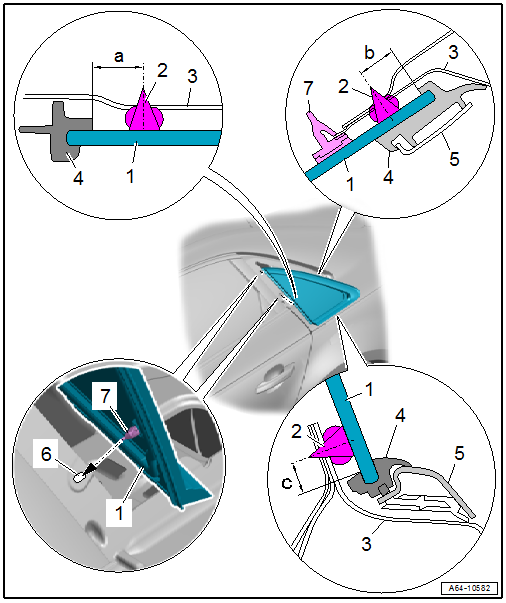
1 - Rear Side Window
- Removing and installing. Refer to → Chapter "Rear Side Window, Removing and Installing".
- After installing, push in using the locating pins -7-
2 - Adhesive Bead
- Observe minimum curing times. Refer to → Chapter "Minimum Curing Times for Bonded Windows".
- Different distances to window edge:
- Dimension -a- = 8 mm
- Dimension -b- = 7.5 mm
- Dimension -c- = 7.5 mm
- Adhesive bead thickness.
3 - Side Window Frame
4 - Molding
- Must not be damaged in the visible area
5 - Trim Molding
- Only for versions with the gloss package
6 - Securing Hole
7 - Centering Pin
- No replacement part
- Is cut through when removing the window
Overview - Rear Side Window, Avant
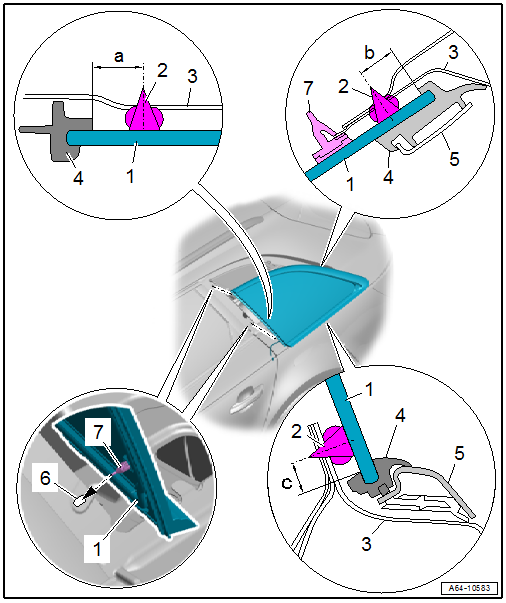
1 - Rear Side Window
- Removing and installing. Refer to → Chapter "Rear Side Window, Removing and Installing".
- After installing, push in using the locating pins -7-
2 - Adhesive Bead
- Observe minimum curing times. Refer to → Chapter "Minimum Curing Times for Bonded Windows".
- Different distances to window edge:
- Dimension -a- = 8.5 mm
- Dimension -b- = 7.5 mm
- Dimension -c- = 7.5 mm
- Adhesive bead thickness.
3 - Side Window Frame
4 - Molding
- Must not be damaged in the visible area
5 - Trim Molding
- Only for versions with the gloss package
6 - Securing Hole
7 - Centering Pin
- No replacement part
- Is cut through when removing the window
READ NEXT:
 Rear Side Window, Removing and Installing
Undamaged Side Window, Removing, Sedan
Special tools and workshop equipment
required
Wedge Set -T10383-
Wedge 1 -T10383/1-
Cutting Tool for Bonded Windows -VAS6452-
Bonded Window Tool Kit - Pull Han
Door Windows
Overview - Front Door Window
1 -
Window Regulator
Overview. Refer to
→ Chapter "Overview - Window Regulator".
2 -
Door Window
Removing and installing. Refer to
→&n
SEE MORE:
Refrigerant Circuit Complaints
Possible Refrigerant Circuit Concerns
Test Requirements
Electrical Equipment, vacuum system and air duct
fault-finding has not revealed any faults. Refer to Guided Fault
Finding for the A/C system ("OBD" or "Guided Fault Finding for
the A/C system"),
→ Wiring diagrams, Troubleshooting &
Overview - Peripheral Camera System
The peripheral camera system (KA6) consists of four cameras.
They are located in the radiator grille, in both side exterior
mirrors and in the rear lid. The system helps the driver when
parking, maneuvering or when driving off-road. The camera images
are displayed on the Front Information Displa
© 2019-2026 Copyright www.audia4b9.com
