
Audi A4: Underbody Trim Panel
Audi A4 (B9) 2016-2026 Service Manual / Body / Body Exterior / Exterior Equipment / Underbody Trim Panel
Overview - Underbody Trim Panels
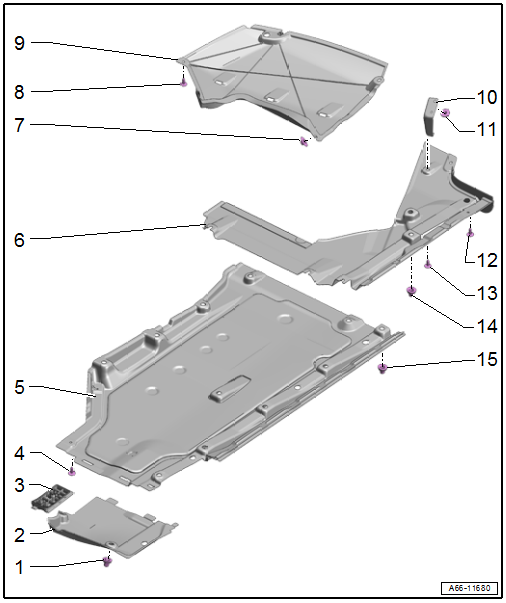
1 - Nut
- 2 Nm
- Quantity: 2
2 - Front Underbody Panel
- Removing and installing. Refer to → Chapter "Underbody Trim Panel, Removing and Installing, Front".
3 - Impact Protector
4 - Bolt
- 2 Nm
5 - Center Underbody Trim Panel
- Removing and installing. Refer to → Chapter "Underbody Trim Panel, Removing and Installing, Center".
6 - Rear Underbody Trim Panel
- Removing and installing. Refer to → Chapter "Underbody Trim Panel, Removing and Installing, Rear".
7 - Nut
- 2 Nm
- Quantity: 2
8 - Bolt
- 2 Nm
- Quantity: 3
9 - Side Underbody Trim Panel
- Removing and installing. Refer to → Chapter "Underbody Trim Panel, Removing and Installing, Side".
10 - Bracket
- For the rear underbody trim panel
11 - Nut
- 2 Nm
12 - Bolt
- 2 Nm
13 - Bolt
- 2 Nm
- Quantity: 2
14 - Nut
- 2 Nm
- With fastener
- Quantity: 2
15 - Nut
- 2 Nm
- With fastener
- Quantity: 11
Overview - Underbody Bracing
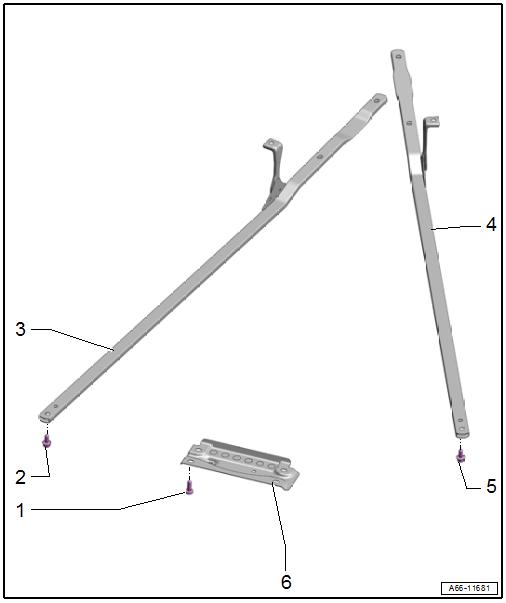
1 - Bolt
- 55 Nm
- Quantity: 4
2 - Bolt
- 50 Nm + 90º
- Replace after removing
- Quantity: 5
3 - Right Diagonal Brace
- Removing and installing. Refer to → Chapter "Diagonal Braces, Removing and Installing".
4 - Left Diagonal Brace
- Removing and installing. Refer to → Chapter "Diagonal Braces, Removing and Installing".
5 - Bolt
- 50 Nm + 90º
- Replace after removing
- Quantity: 5
6 - Tunnel Brace
- Removing and installing. Refer to → Chapter "Tunnel Brace, Removing and Installing".
READ NEXT:
 Underbody Trim Panels, Removing and Installing
Underbody Trim Panel, Removing and Installing, Front
Removing
- Remove the nuts -arrows-.
- Remove the front underbody trim panel -2-
from the center underbody trim panel -1-.
Installing
Roof Molding/Roof Railing
Overview - Roof Railing
1 -
Nut
Quantity: 4
Insert with locking fluid. Refer to the Parts Catalog.
Tightening specification and sequence. Refer to
→ Fig. "Roof Railing - Tightening
Exterior Rearview Mirror
Overview - Exterior Rearview Mirror
1 -
Mirror Trim
2 -
Bolt
1.5 Nm
3 -
Mirror Adjusting Unit
Removing and installing. Refer to
→ Chapter "Mirror Adjusting
SEE MORE:
Spring, Removing and Installing
Special tools and workshop equipment required
Pneumatic/Hydraulic Foot Pump -VAS6179-
Spring Tensioning System -VAS6274-
Spring Tensioning System - Spindle -VAS6274/3-
Spring Tensioning System - T-Bar -VAS6274/5-
Supplement Set - Thrust Plate with Securing Plate
-VAS6274/12-2-
Supplement Set
Transmission, Transporting
Special tools and workshop equipment required
Shop Crane -VAS6100-
Lifting Tackle -3033-
Hook And Support Tool -3311- with Hook And Support Tool -
Bolt -3311/1-
Retaining Strap -T40155-
Caution
Risk of damaging the transmission by mixing ATF and
transmission fluid (MTF) through the
© 2019-2026 Copyright www.audia4b9.com
